Open source · Free, MIT-licensed
Review your work before you share it.
Edit a post, test an interface, review a product plan, or audit a board deck. Six skills return findings and specific changes you can make.
v1.4.0 · Six skills · MIT-licensed
post-editor
Voice kept“Move the result from line 4 to the opening sentence.”
test-ui-ux
Score 6.8 / 10“Inviting a teammate takes 9 steps and 6 fields. Use saved account details to reduce it to 3 steps.”
product-feature-feedback
SPARK 19 / 25“Purposeful: 5. Known: 2. Add an entry point where users encounter the problem.”
Board-deck audit
Review the deck before the meeting.
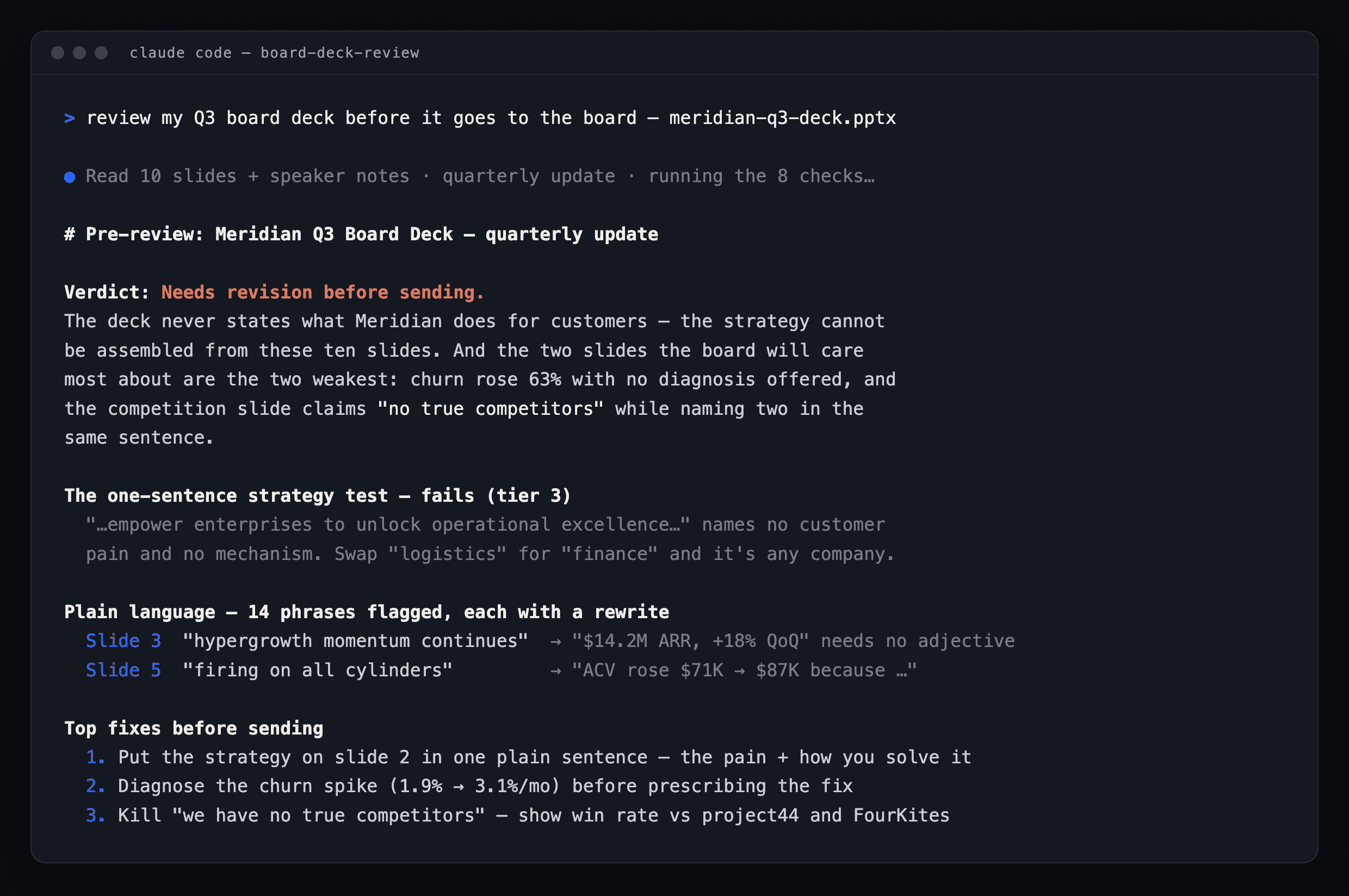
Eight checks cover strategy, customer evidence, performance, cash, and decisions. The review returns a verdict and 3–7 prioritized fixes.
board-deck-audit
Ready after small fixes- 01State the strategy in one sentence.
- 02Explain what caused churn to rise.
- 03Show the runway calculation.
01 · The checklist
Eight checks for your board deck
01
Plain language
Finds jargon and suggests specific, plain-language replacements.
02
The one-sentence strategy test
Checks whether the deck identifies the customer problem and explains how the company solves it.
03
Customer evidence behind product plans
Checks the customer conversations and findings supporting each roadmap item.
04
Competitive reality
Looks for competitor activity and win/loss evidence supporting the company’s positioning.
05
Results and causes
Checks that sales, churn, financial, and team updates explain both the result and its cause.
06
Accountability
Compares results with the plan, checks metric consistency, and follows up on prior commitments.
07
Cash clarity
Checks burn, runway, and the calculation supporting the next fundraising date.
08
The asks
Separates decisions from requests for help and checks that the deck provides enough context for each.
02 · The output
What you get back
A review in chat and a shareable Markdown file, with a readiness verdict, suggested rewrites, section findings, accountability and cash checks, likely board questions, and 3–7 prioritized fixes.
03 · The plugin
Six skills, one install
Attach your material, provide a URL, or paste a draft. Ask for the review you need, or select a skill by name.
01
post-editor
Edits X, LinkedIn, and social-caption drafts. Returns revised copy that preserves facts, intent, and voice.
02
test-ui-ux
Reviews live interfaces, screenshots, and specs. Returns a 1–10 score from five evaluators, counts of steps, clicks, and fields, evidence, prioritized fixes, and JSON for follow-up reviews.
03
product-feature-feedback
Scores a feature or product out of 25 using SPARK: Simple, Purposeful, Attractive, Reliable, and Known. Recommends three improvements.
04
product-plan-feedback
Reviews product plans, roadmaps, and go-to-market plans. Returns a readiness verdict, area assessments, and prioritized gaps to address.
05
board-feedback
Returns a concise director’s assessment of a board deck and the issues to address.
06
board-deck-audit
Audits a board deck’s claims, calculations, and evidence. Returns findings and prioritized fixes.
04 · Install
Choose your AI workspace
Install through the OpenAI Plugins Directory, Claude Desktop, or skills.sh.
ChatGPT Work & Codex
Directory listing live
Open the ThoughtfulBits Skills listing, select the plus button, and start a new chat. Directory updates may arrive after the GitHub release.
Supported in ChatGPT Work on web/desktop, Codex desktop, and Codex CLI — not ordinary Chat, mobile, or the IDE extension.
Claude Desktop
Available now · v1.4.0
Add the GitHub repository as a plugin marketplace and sync it. Follow the illustrated steps below.
No terminal is required.
skills.sh
Universal package · v1.4.0
Use the public repository with the open skills installer. Install post-editor by itself or install all six skills into every compatible agent directory.
No ThoughtfulBits account or server is required.
Install in ChatGPT Work or Codex
Installation takes three steps in the OpenAI account or workspace where you want to use the skills.
STEP 01
Open the directory listing
Open ThoughtfulBits Skills in the OpenAI Plugins Directory while signed in to the account or workspace where you want to use it.
STEP 02
Select the plus button
Install the plugin from its listing. ThoughtfulBits Skills contains instructions only — there is no ThoughtfulBits account, server, or separate data connection.
STEP 03
Start a new conversation
Attach a deck, plan, roadmap, feature spec, or UI screenshot; provide a live URL; or paste a social draft. Type @ThoughtfulBits Skills to invoke it explicitly, or ask in plain language.
Install in Claude Desktop
STEP 01
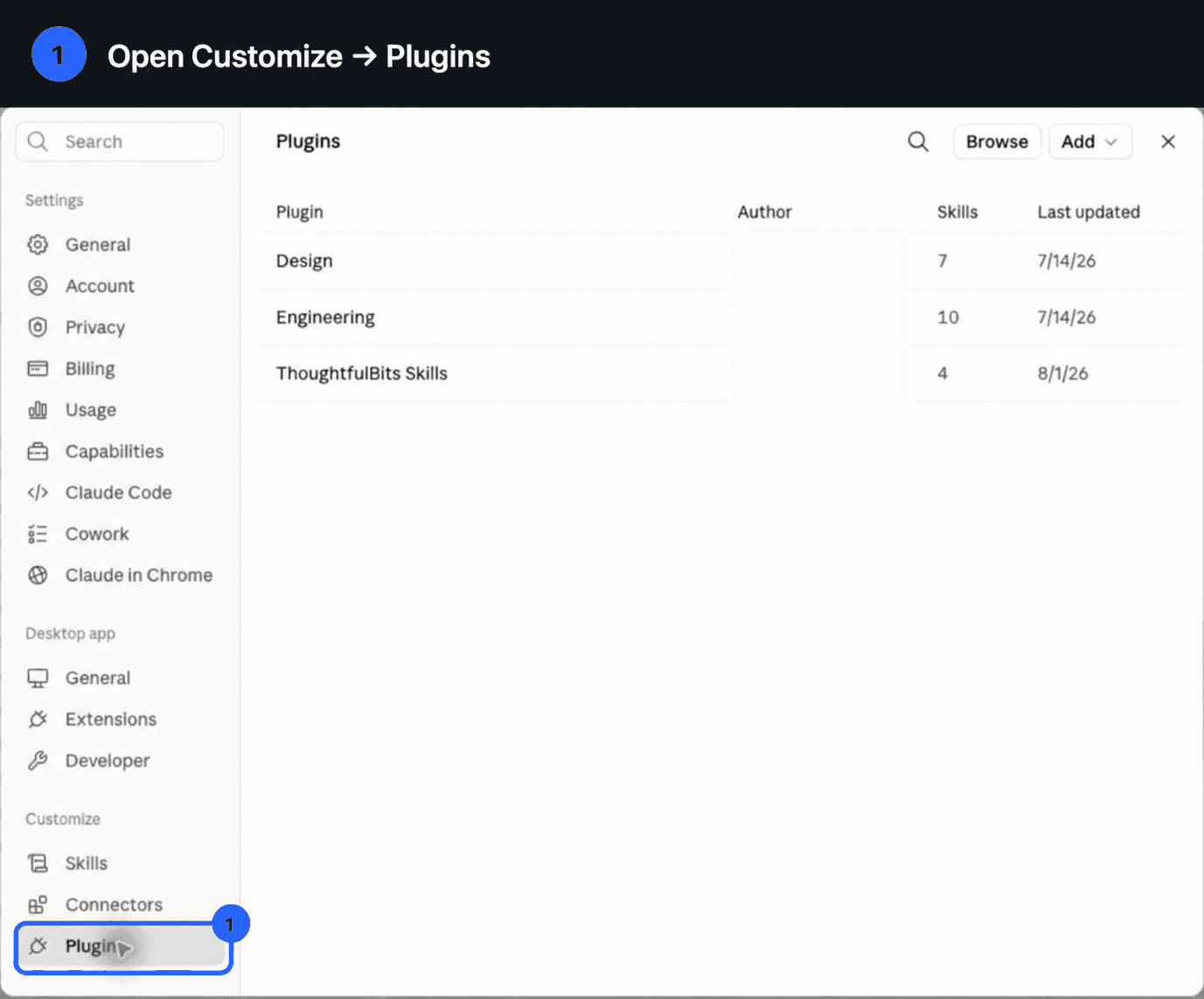
Open Plugins
Open Claude Desktop. In the left sidebar, choose Customize, then Plugins.
Customize → Plugins STEP 02
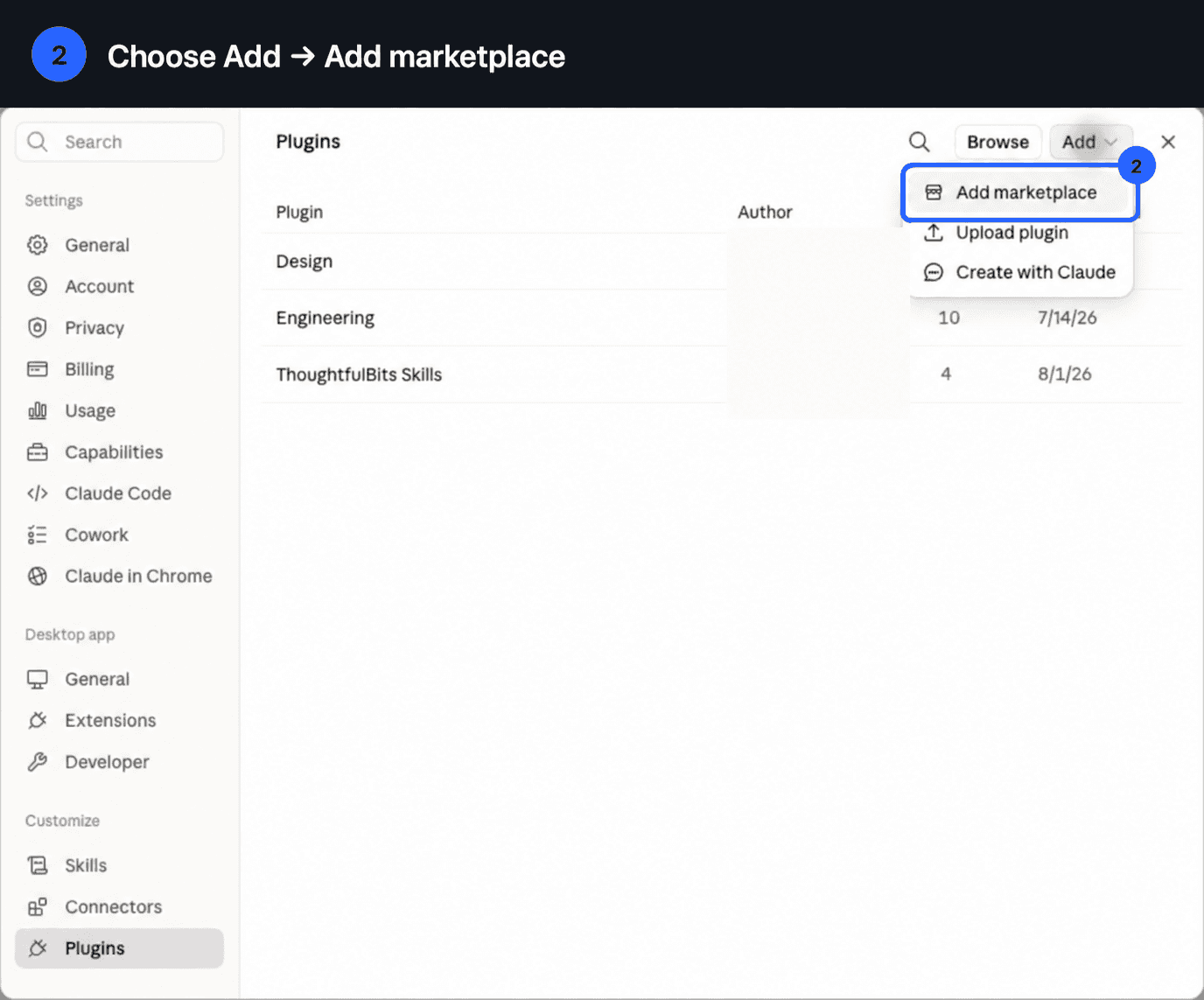
Add a marketplace
Click Add, then choose Add marketplace.
Add → Add marketplace STEP 03
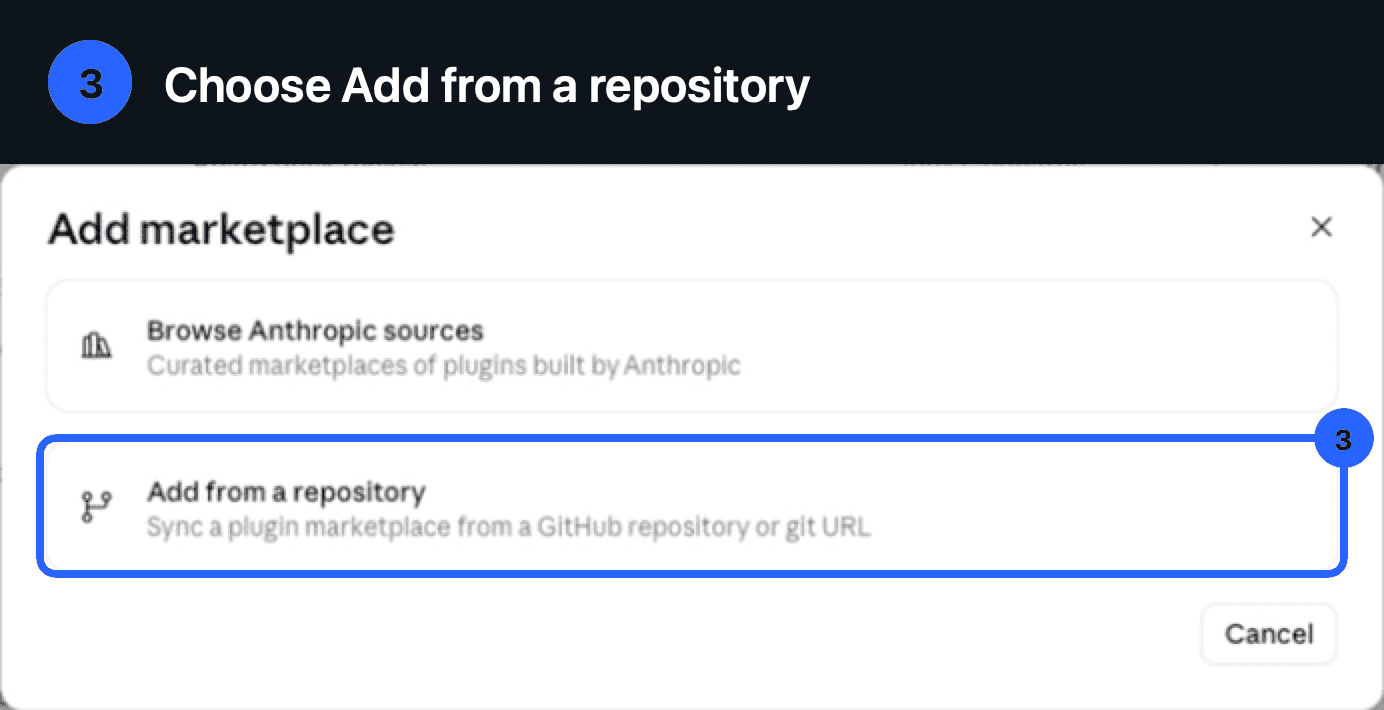
Use a repository
Choose Add from a repository.
Add marketplace → Add from a repository STEP 04
Paste the GitHub URL
Paste the public repository URL below, then click Sync.
https://github.com/thoughtfulbits/thoughtfulbits-skills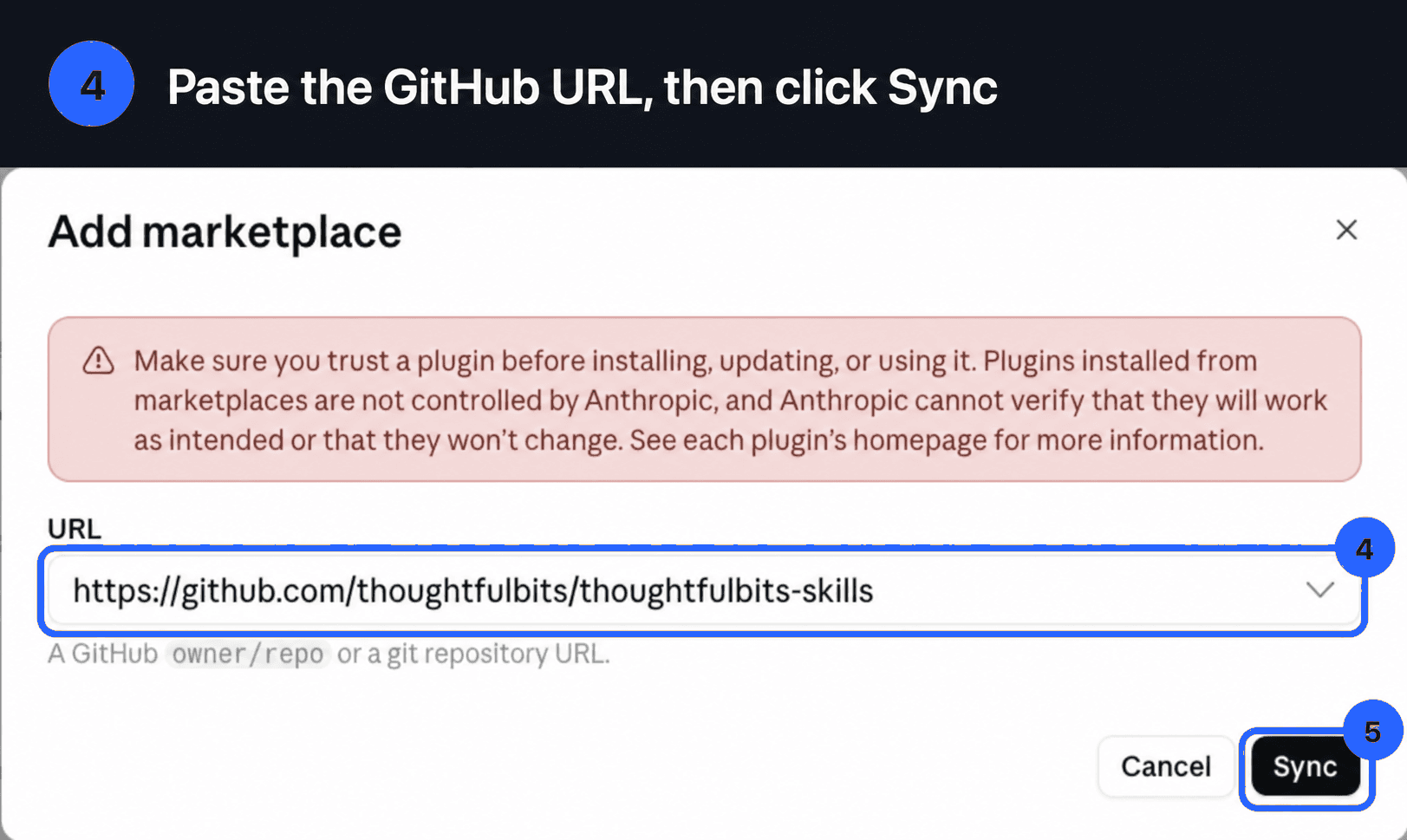
Paste the GitHub URL, then Sync STEP 05
Confirm it is enabled
Claude adds and enables ThoughtfulBits Skills. Confirm that its toggle is on.
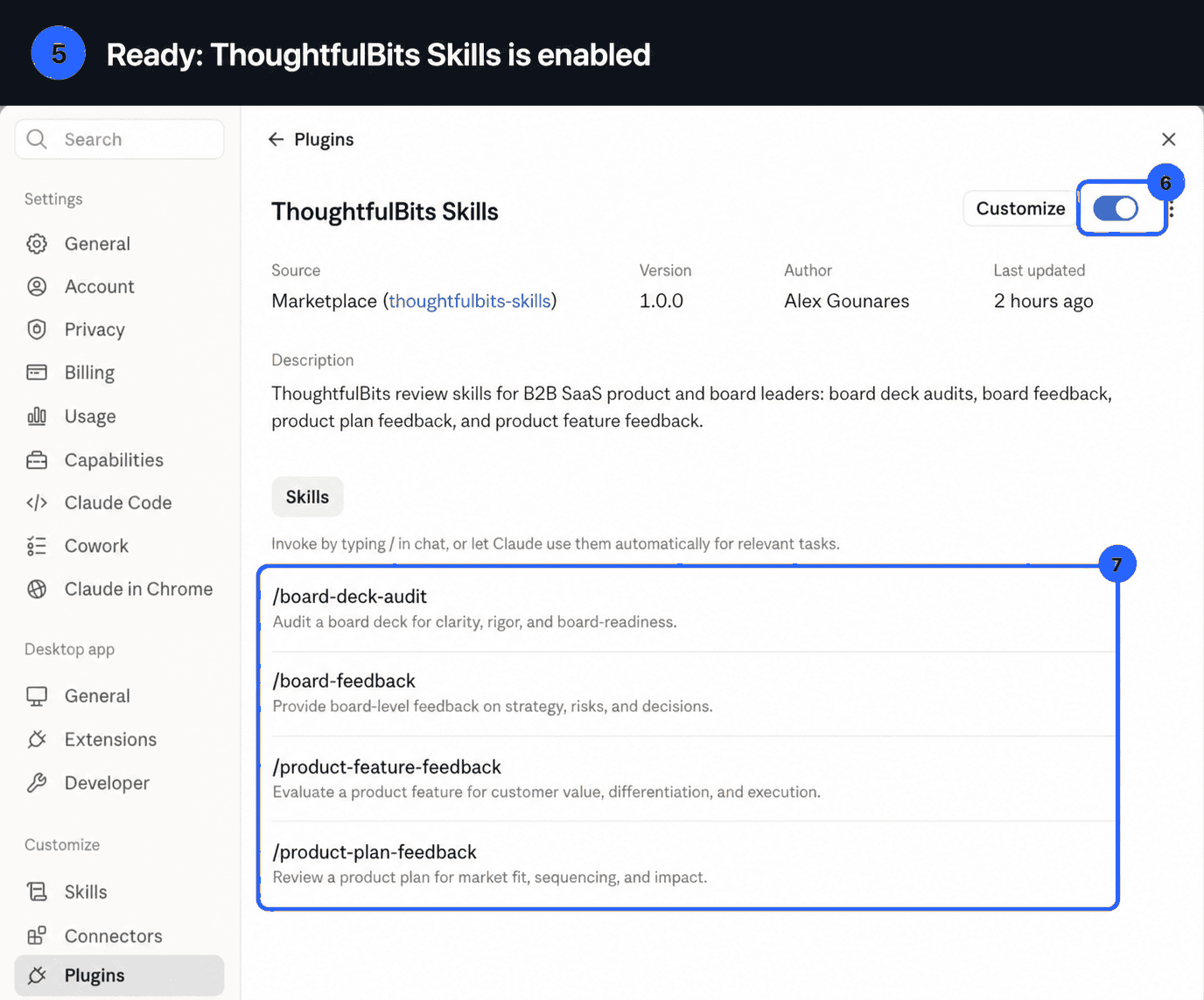
ThoughtfulBits Skills is ready when the toggle is on
Use it in a new chat
Test this UI thoroughly. For every screen, identify the actions that matter, count the steps, clicks, and fields, and show the simplest safe path before giving me the five-agent 1–10 score.
Provide a URL, screenshot, product spec, document, or social draft in a new conversation. Live UI tests can produce a full verdict; screenshot and spec reviews remain provisional. Review and confirm AI-generated input before submission.
Built from the criteria I use to review board decks, products, interfaces, and writing. The skills are open source under the MIT license.